游戏界面图解In-game walkthrough
以下截图来自 PC 版(简体中文界面,1920×1080,游戏版本见页首),截图时启用了本站的数据示例 Mod,以及仓库自带的 Lua 示例和舰船贴图示例。 Screenshots from the PC build (Simplified Chinese UI, 1920×1080, version in the header), taken with this site's data example plus the repository's Lua and ship-texture samples enabled.
入口:封面菜单Entry point: title menu
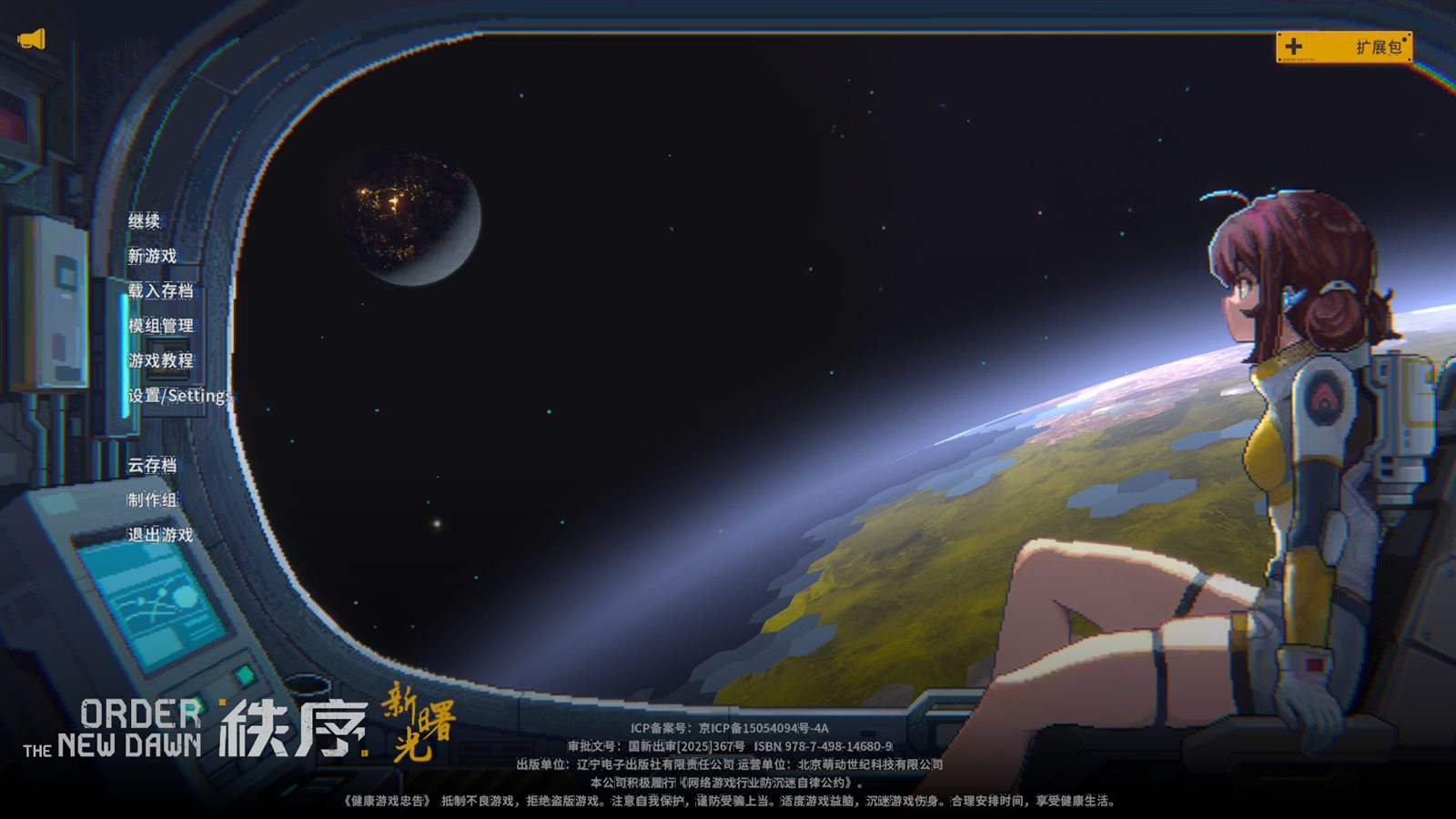 1
- 模组管理:打开 Mod 管理界面。在这里的修改需要重启游戏才会生效。Mod Management opens the mod manager. Changes made there take effect after a restart.
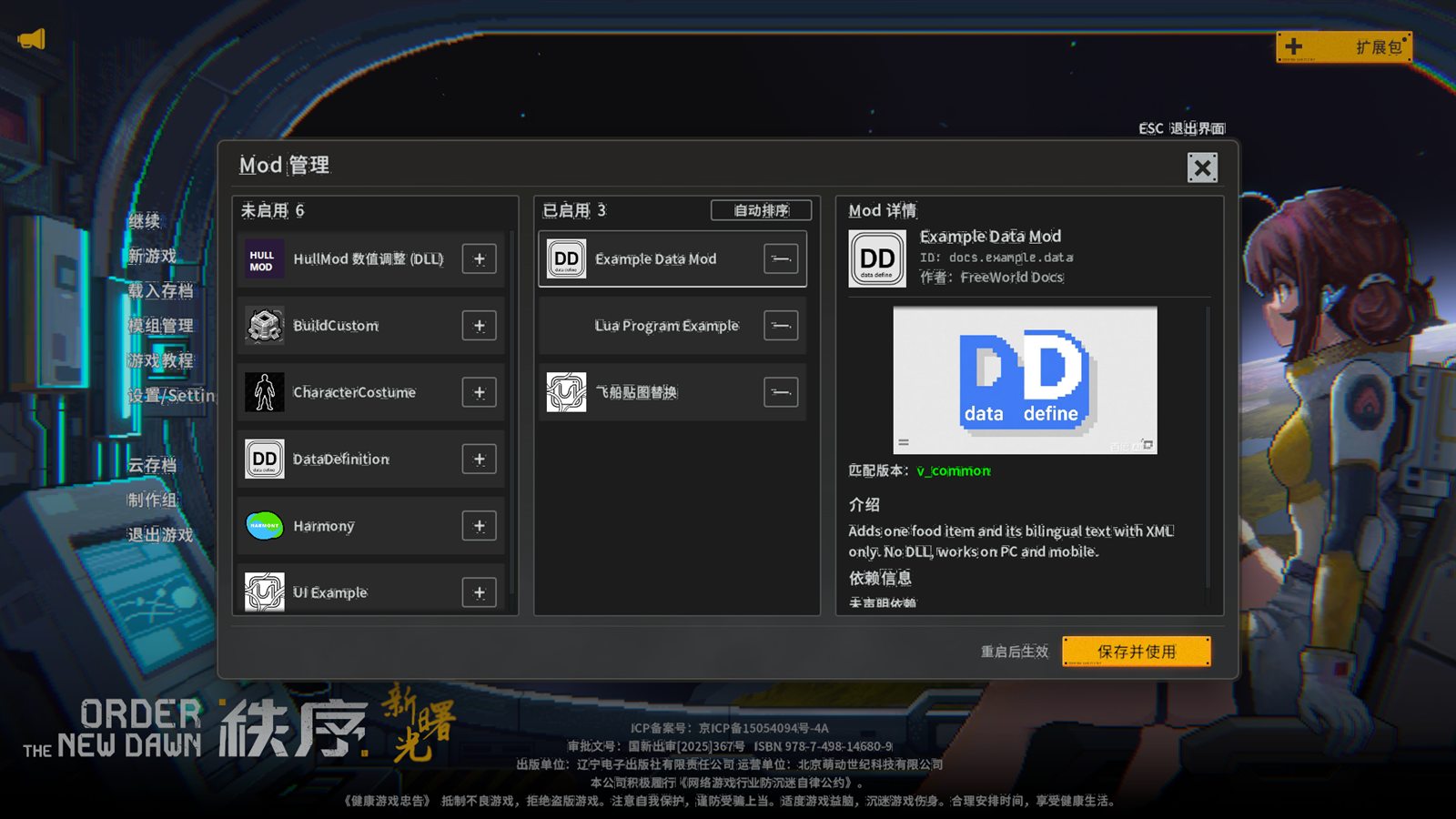
Mod 管理界面The mod manager
 1
2
3
4
5
6
7
8
9
- 未启用:扫描到但未启用的 Mod。清单无效(缺少
packageId或versions)的文件夹不会出现在这里。Disabled: mods found but not enabled. Folders with an invalid manifest (nopackageIdorversions) never appear. - +:启用,移到右侧列表末尾。+ enables the mod, appending it to the right-hand list.
- 已启用:从上到下就是加载顺序,可以拖动调整。依赖必须排在依赖它的 Mod 之上,否则条目会显示警告。Enabled: top to bottom is the load order; drag to reorder. Dependencies must sit above the mods that need them, or the entry shows a warning.
- 自动排序:按清单里的
dependencies把依赖移到前面;缺少依赖时给出提示。Auto Sort moves dependencies up according todependenciesin the manifests and reports missing ones. - —:停用。— disables the mod.
- Mod 详情:来自
manifest.xml的icon、name、packageId、author,下方大图是previewImage。Mod Details:icon,name,packageIdandauthorfrommanifest.xml; the large image ispreviewImage. - 匹配版本:按版本规则选中的版本目录。显示为
v_common说明没有针对当前版本的专用目录。下方“介绍”是desc。Matching Version: the folder chosen by the version rules;v_commonmeans there's no version-specific folder. “Introduction” below isdesc. - 依赖信息:选中版本的
dependencies。Dependencies of the selected version. - 保存并使用:写入
mod.dat并提示重启。列表没有变化时直接关闭。Save and Use writesmod.datand offers a restart; closes directly if nothing changed.
数据 Mod 在游戏中的样子A data mod in game
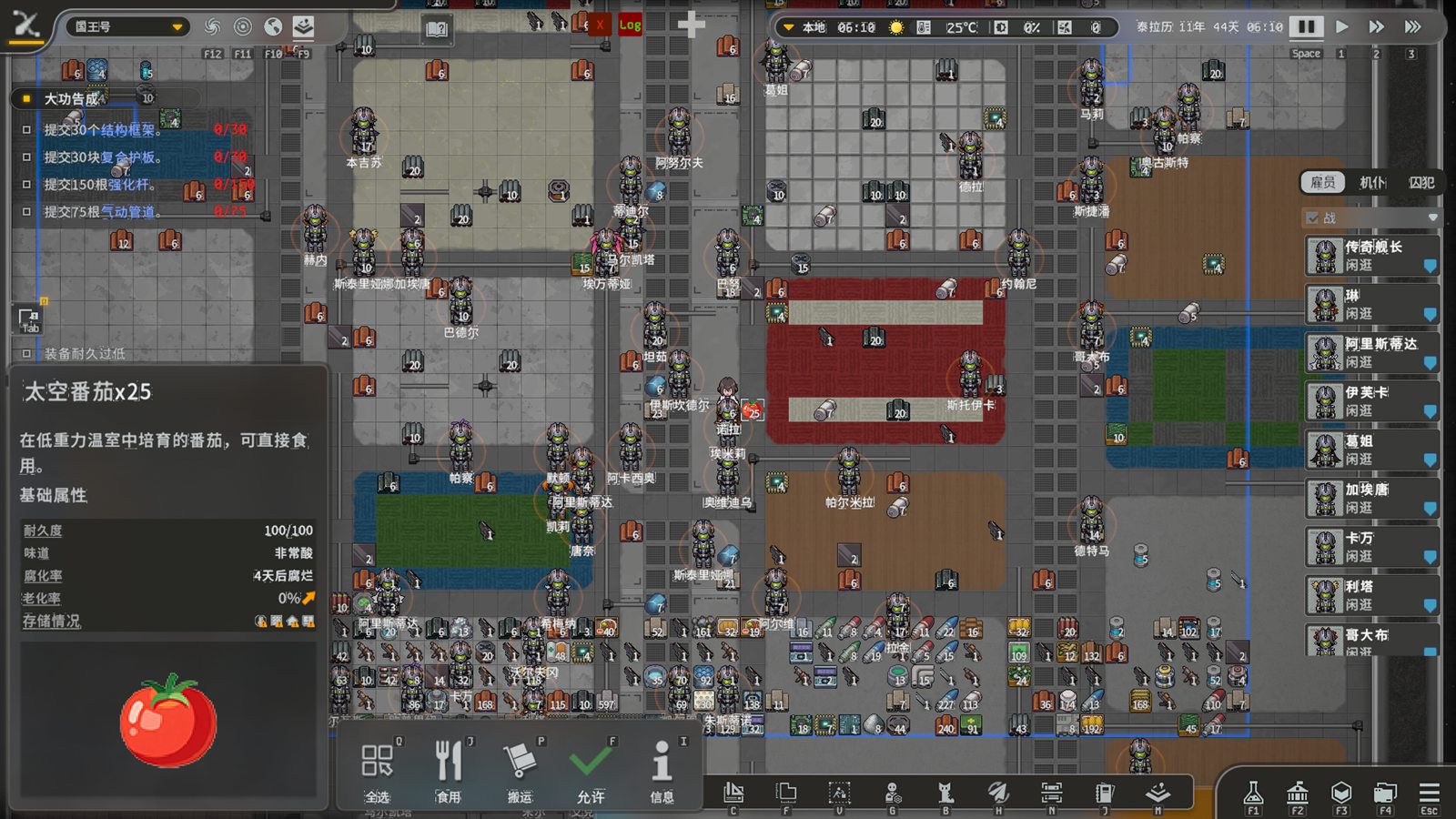
下图是快速开始中的示例 Mod:在殖民地中放下 25 个“太空番茄”并选中。每个标注对应 def.xml 中的一个字段,或说明它来自哪里。
The example from Getting started: 25 “Space Tomatoes” dropped in a colony and selected. Each marker maps to a field in def.xml or explains where the value comes from.
 1
2
3
4
5
6
- 标题 =
Name经语言表翻译(id_docs_example_space_tomato_name→ “太空番茄”),后面是数量。Title =Nametranslated via the language table (id_docs_example_space_tomato_name→ “Space Tomato”), followed by the stack count. - 描述 =
Desc经语言表翻译。Description =Desctranslated via the language table. - 基础属性(耐久度、味道、腐烂时间、老化率)没有在 XML 中填写,全部继承自
DependID="3"的模板食物。Base stats (durability, taste, spoilage, aging) were not set in XML; they are inherited from theDependID="3"template. - 大图 =
RawIcon指定的Resources/Textures/space_tomato.png。Large image =RawIcon, i.e.Resources/Textures/space_tomato.png. - 地图上的物品图标同样来自
RawIcon(打包进 Mod 图标图集)。The map icon also comes fromRawIcon(packed into the mod icon atlas). - 底部操作(食用、搬运、允许等)由物品类型决定,与 Mod 无关。The action bar (eat, haul, allow…) is determined by the item type, not by the mod.
LUA: [docs.example.lua] loaded, version=v_common, … 与 LUA: [docs.example.lua] T_FoodDef 3 price 5.0 -> 10.0,进入游戏后 T_FoodDef.getDataID("3").Price 为 10,示例食物 docs.example.data_space_tomato 价格为 12.5。
With both example mods enabled, the log shows LUA: [docs.example.lua] loaded, version=v_common, … then LUA: [docs.example.lua] T_FoodDef 3 price 5.0 -> 10.0; in game T_FoodDef.getDataID("3").Price is 10 and the example food docs.example.data_space_tomato costs 12.5.
两层玩法与配置表Two layers and their tables
地面殖民与星系两层画面的截图和对应表族见概览。Screenshots of the ground and galaxy layers and their table families are on the overview.
截图的更新Keeping screenshots current
界面改版后,按 README.md 中的步骤重新截图并替换 images/ 下的同名文件,再按需调整标注点的百分比坐标。
After UI changes, re-capture following README.md, replace the files in images/ under the same names, and adjust the percentage marker positions if needed.